Immediate feedback turns a Matching question into guided practice: each correct pair is confirmed while the learner is still working, so mistakes can be reconsidered before the page is submitted.
Turn on both settings
Create or edit a Matching question, add the prompt-and-match pairs, and turn on Immediate feedback in the question settings.
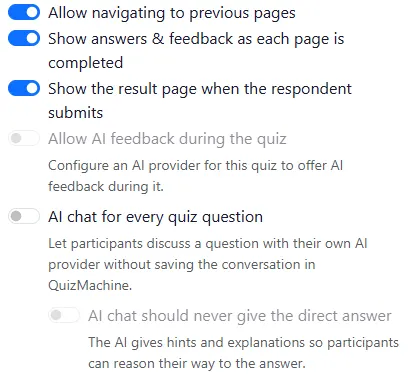
- Immediate feedback
- Show answers & feedback as each page is completed
Picture Choice
Selecting a correct picture immediately shows a green outline and a check mark with accessible text. An incorrect choice stays unmarked and can be changed.
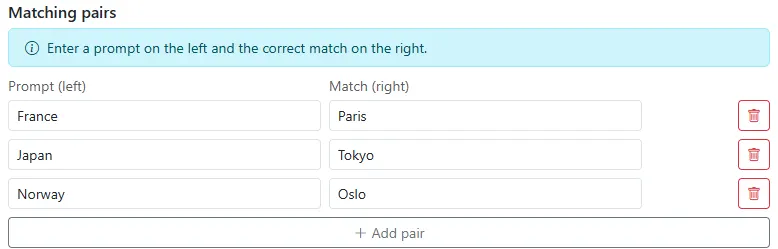
Then open Configure and enable Show answers & feedback as each page is completed. Both settings are required: the quiz-level setting permits feedback during an attempt, while the question-level setting chooses this Matching interaction.
What the learner sees
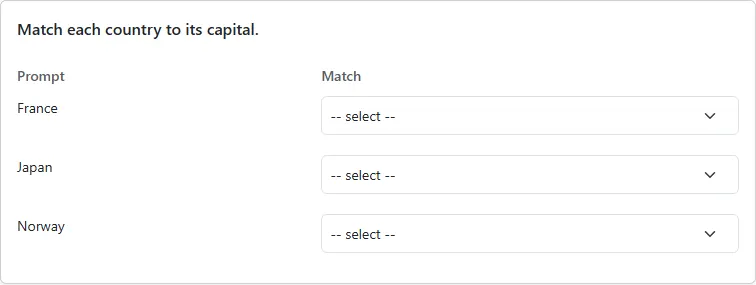
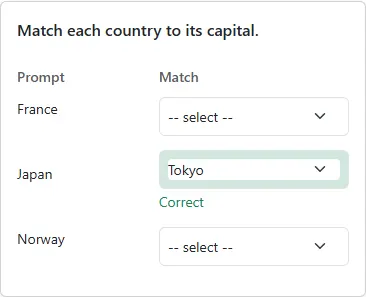
The learner selects a match for each prompt in the normal Take or Embed view. Nothing is marked until a choice is made.
When a selected pair is correct, that choice fades to light green immediately. It stays selected and the learner can continue with the remaining pairs.
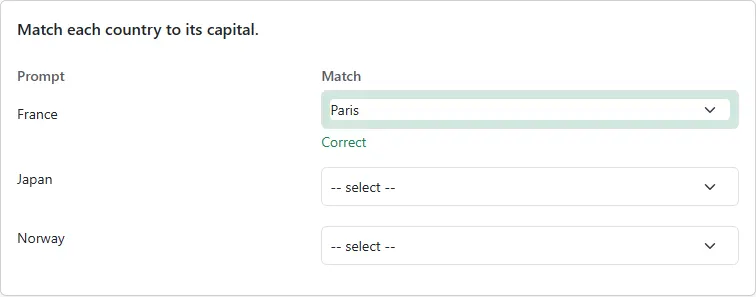
An incorrect choice stays neutral and can be changed. The interface never marks an incorrect option as correct and does not lock the learner into a mistake.
Important boundaries
- Matching Text: This feature now also works for Matching Text, confirming each typed answer the moment it matches (issue #1916). For the typed-answer version, see Instant feedback for typed matching (Matching Text).
- The browser sends only the selected pair for checking and does not receive the answer key. Correctness is decided on the server.
- The same controls work at mobile widths and in embedded quizzes. People who prefer reduced motion receive the state change without the fade animation.
- Picture Choice: The pictures in this guide show the workflow; they are not image-based matching options. Use a Picture Choice question when learners should select an image as the answer.